Customer Analytics
Use this page to see who your customers are — your top spenders, your regulars, and the ones who've stopped coming in.
Quick steps
- Click Reports in the top menu, then Customer Analytics (under Customers & staff).
- It opens on the last 90 days. Tap a quick preset (Today, This Week, This Month and so on), or set Start Date and End Date and click Apply Filters.
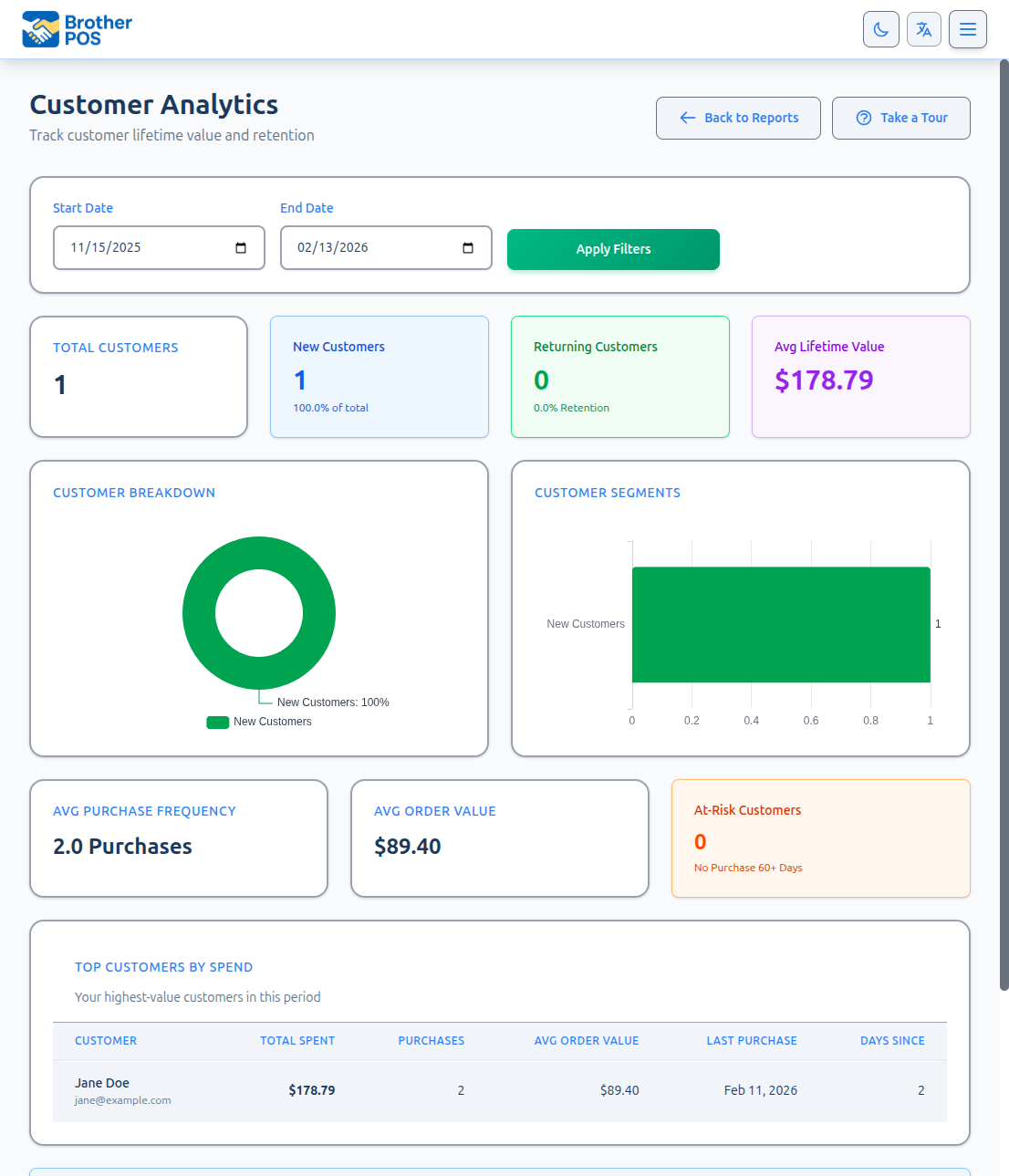
- Read the cards across the top: Total Customers, New Customers, Returning Customers, At-Risk Customers and the averages.
- Scroll down to Top Customers by Spend, Loyal Customers, At-Risk Customers and New Customers. Click a column heading to sort.
Sales rung without a customer are left out. Ask cashiers to add the customer to each sale.
Common questions
Why are some sales not showing in customer analytics? Only completed sales with a customer profile attached appear in this report. Sales without a customer are counted in the Sales Report but not here.
Is "Total Spent" before or after tax? Before tax, after discounts, less returns — the same net sales the Sales Report counts.
Why is the At-Risk table empty? It needs 2+ purchases and a 60-day gap, all inside your date range. Use a longer range such as the default 90 days.
Can I see what specific products a customer buys? Not from this report — it shows totals per customer. Open the customer under Customers to see their profile and purchase statistics.
Can I export this report? There is no export button on this report.
I don't see Customer Analytics on the Reports page. It's included on plans with advanced reports.
More detail: what the report is
The Customer Analytics report helps you understand who your customers are and how they shop. It ranks your highest spenders, picks out your regulars, flags customers who have stopped coming in, and works out average spending — all useful for marketing, loyalty and purchasing decisions.
Customer Analytics is included on plans with advanced reports. If you don't see the card on the Reports page, your plan doesn't include it.
More detail: setting the date range
Accessing the Report
- Log in to the Admin Panel.
- Click Reports in the top navigation bar.
- Click Customer Analytics.
Setting the Date Range
The report opens on the last 90 days. You can click a quick preset — Today, Yesterday, This Week, Last Week, This Month or Last Month — or pick a Start Date and End Date and click Apply Filters.
Everything on the page is worked out from sales inside the date range only. A customer's "purchases", "total spent" and "last purchase" all mean within that range, not over their whole history.
Only completed sales that have a customer profile attached are counted. Sales rung without a customer are left out entirely. To get the most from this report, have cashiers look up or create a customer profile for each sale.
Store Filter
If your store runs in dual store mode, a Store dropdown (both stores or one side) narrows the report to sales from that side. It isn't shown otherwise.
More detail: summary cards
Summary Cards
| Card | What it shows |
|---|---|
| Total Customers | Number of different customers who made a purchase in the range. |
| New Customers | Customers whose first purchase ever at your store falls inside the range, with their share of the total. |
| Returning Customers | Customers who bought before the range and came back in it, with a retention percentage. |
| Avg Lifetime Value | Average amount each customer spent in the range. |
| Avg Purchase Frequency | Average number of purchases per customer in the range. |
| Avg Order Value | Average of each customer's own average purchase. |
| At-Risk Customers | Customers with 2 or more purchases in the range whose last purchase was 60 or more days ago. |
Two charts sit below the cards: Customer Breakdown (new vs. returning) and Customer Segments (loyal, at-risk and new).
More detail: the report tables
Report Tables
Each table appears only when it has at least one customer. Every column header can be clicked to sort.
Top Customers by Spend
Every customer who bought in the range, highest spender first:
| Column | What it shows |
|---|---|
| Customer | Name, with email or phone underneath |
| Total Spent | Their net sales in the range: what they paid after discounts, before tax, less anything they returned in the range. It is the same figure the Sales Report counts, so all customers' spending adds up to the Sales Report's net sales for sales that had a customer. |
| Purchases | Number of completed purchases in the range |
| Avg Order Value | Total Spent divided by Purchases |
| Last Purchase | Date of their most recent purchase in the range |
| Days Since | Days from that purchase to today |
A small group of top customers often brings in a large share of revenue. Consider a VIP loyalty tier or personal service to keep them coming back. See Loyalty Tiers for setup.
Loyal Customers (5+ Purchases)
Customers with five or more purchases in the range, most purchases first, showing Purchases, Total Spent, Avg Order Value and Avg Days Between purchases.
At-Risk Customers
Customers with at least two purchases in the range who haven't bought anything for 60 or more days, longest gap first. Columns are Last Purchase, Days Since, Total Purchases and Lifetime Spent (within the range).
Because both the purchases and the 60-day gap must fall inside your range, this table only fills up on longer ranges — the default 90 days works, a one-month range never will.
New Customers This Period
First-time customers — people whose first purchase ever at your store is in the range — highest spender first, with First Purchase, Purchases, Total Spent and Avg Order Value.
If no customer purchases are found at all, the page shows No Customer Data Available.
More detail: recommended periods and reading the data
Recommended Periods
| Period | Use Case |
|---|---|
| Last 30 days | Current customer activity snapshot |
| Last 90 days (the default) | Separating regulars from occasional shoppers; spotting at-risk customers |
| Last 12 months | Long-term customer behaviour |
Interpreting Customer Data
High Spend, Low Frequency
Customers who spend a lot per visit but come infrequently may:
- Live far away and batch their purchases.
- Be buying for events or special occasions.
- Respond well to a "we miss you" message or a loyalty incentive.
Low Spend, High Frequency
Customers who visit often but spend little may:
- Be buying single items or small quantities.
- Respond well to bundle deals or upselling.
- Be loyal customers worth cultivating with better product recommendations.
Declining Top Customers
If a customer who used to rank near the top drops down the list:
- Check their Days Since — they may have stopped coming.
- Consider reaching out if your store has a relationship with them.
- Review whether a competitor opened nearby or your product mix changed.
Customer analytics data should be used responsibly. Avoid sharing individual customer spending details with non-management staff. Use the data for business decisions, not for singling out customers.
More detail: using it for business decisions
Using Customer Analytics for Business Decisions
Loyalty Program Optimization
- Look at how many customers reach the Loyal Customers table — are rewards reachable for most customers, or only a few?
- Watch Avg Purchase Frequency over time — it should rise if your loyalty program is working.
Marketing Decisions
- Reach out to the customers in the At-Risk Customers table.
- Create special offers for your top 20 customers to reinforce their loyalty.
Product Mix
- Cross-reference your top customers' purchases with your product catalog.
- If top customers consistently buy specific categories, make sure those categories are well-stocked.
- Consider asking top customers what new products they would like to see.
What's Next?
- Customer Management — View and edit individual customer profiles.
- Loyalty Setup — Configure your loyalty program based on analytics insights.
- Sales Reports — See the full revenue picture including sales without a customer.