Compliance
Use this page to switch on the daily purchase limit, set how much each product counts toward it, and download your SLGA compliance reports.
Quick steps
To switch on the daily purchase limit:
- Go to Settings > Edit Settings and open the Tax & Compliance tab.
- In the Saskatchewan Compliance section, tick Enforce Purchase Limit at Checkout and check the Daily Purchase Limit (g) (30 g unless you change it).
- Enter your SLGA Site ID in the same section, then click Update Settings.
To download a report:
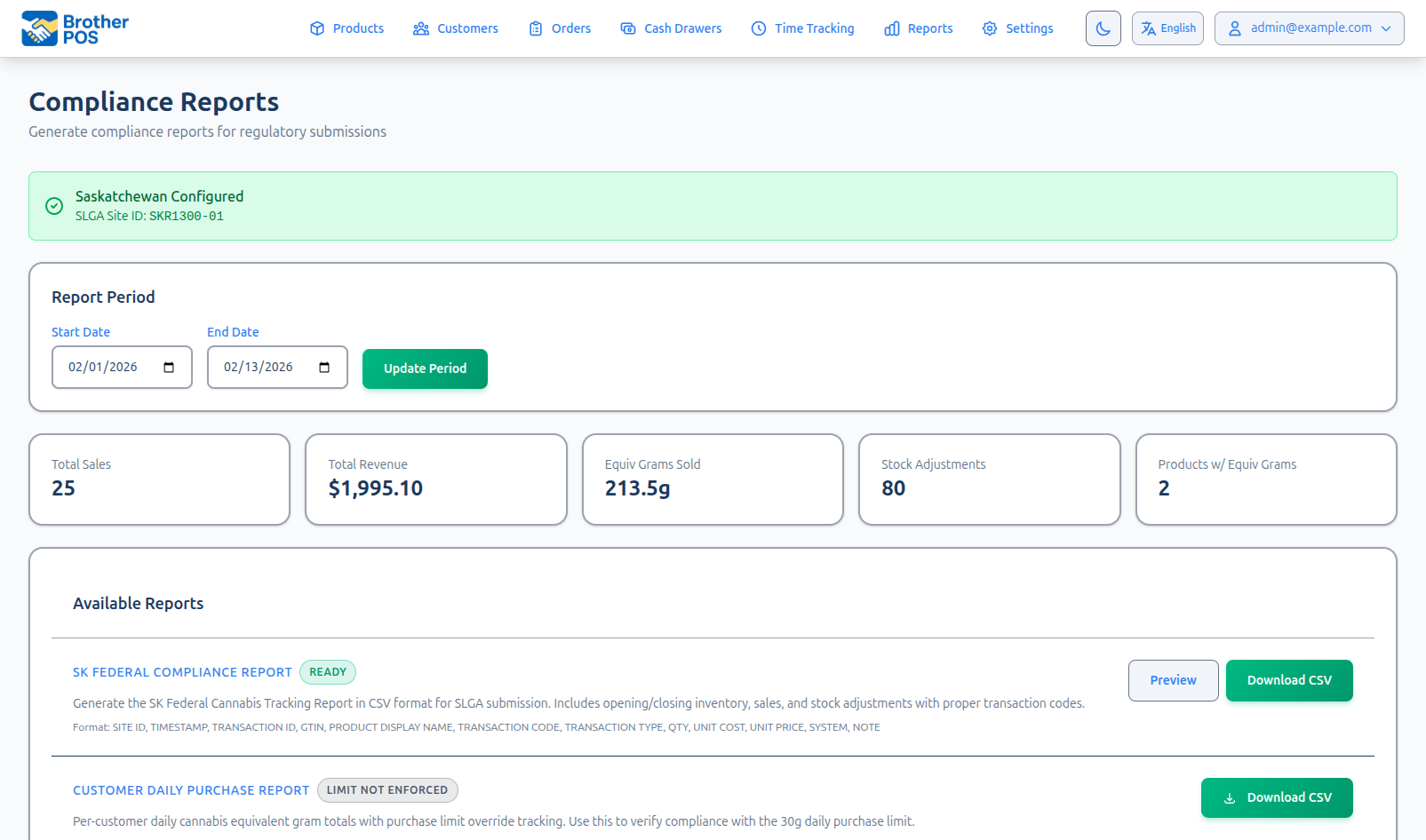
- Click Reports, then the Compliance Reports card.
- Pick a start and end date under Report Period and click Update Period.
- On SK Federal Compliance Report, click Preview to check it or Download CSV to save it. For per-customer daily totals, click Download CSV on Customer Daily Purchase Report.
Brother POS gives you tools to help with compliance, but staying compliant is the retailer's responsibility. Check your setup whenever the rules change.
Common questions
I don't see Compliance Reports on the Reports page. Compliance reporting is switched on for your store by Brother POS support. Contact support to have it turned on.
I don't see the Saskatchewan Compliance section in settings. It only appears when your store's province is set to Saskatchewan.
A customer is over the limit. Can the sale still go through? Only with a manager override: someone with the Override Purchase Limit permission enters their PIN in the Purchase Limit Exceeded window. The override and reason are recorded on the sale.
Why does the Compliance page say some products have no equivalent grams? Those cannabis products have neither a size the system can read nor an Equivalent Grams value, so the limit counts them at an estimate. Click each one and set its size or Equivalent Grams.
Does the limit need a customer on the sale? The cart itself is always checked. To add up everything a customer bought today, attach the customer to the sale.
More detail: where to find it and the stats at the top
Brother POS includes compliance tools designed for Canadian cannabis retailers, with particular support for Saskatchewan provincial requirements. These tools help you stay within regulatory boundaries by tracking daily purchase limits, calculating equivalent grams, and generating CSV exports for the Saskatchewan Liquor and Gaming Authority (SLGA) and federal reporting requirements.
Accessing Compliance
- Log in to the Admin Panel.
- Click Reports in the top navigation bar.
- Click the Compliance Reports card on the Reports index page.
- The compliance page loads with the stats overview and CSV export options.
Compliance reporting is switched on for your store by Brother POS support, on stores with cannabis features whose plan includes it. It is not something you can turn on from your own settings — contact support if you need it activated. Admins and Managers can open it.
Compliance Stats Overview
The compliance page provides a summary view for a Report Period. It starts on the current month to date; pick a start and end date and click Update Period to change it. Five stat cards show:
- Total Sales — Number of completed sales in the period (all sales, not only cannabis).
- Total Revenue — Revenue from those completed sales.
- Equiv Grams Sold — Equivalent grams sold in completed sales, counted the same way as the daily purchase limit (every unit in a case, loose flower by the gram, and the full weight of a heavy pour).
- Stock Adjustments — Number of stock adjustments recorded during the period.
- Products w/ Equiv Grams — Number of products that have an Equivalent Grams value set.
More detail: daily purchase limits and equivalent grams
Daily Purchase Limits
Canadian cannabis regulations impose daily purchase limits per customer. Brother POS tracks purchases in real time and warns budtenders when a customer approaches or exceeds the limit.
How Limits Work
- The federal limit is 30 grams of dried cannabis (or equivalent) per customer per day, and that is Brother POS's default.
- The limit is only checked once it is switched on. Go to Settings > Edit Settings > Tax & Compliance tab, and in the Saskatchewan Compliance section tick Enforce Purchase Limit at Checkout. The Daily Purchase Limit (g) box beside it sets the number of grams. This section only appears when your store's province is set to Saskatchewan.
- Products that are not dried flower are converted to a dried-cannabis equivalent before they are counted. 8 g of shatter, for example, counts as 32 g — over the limit on its own.
How Equivalent Grams Are Worked Out
Brother POS decides how much each product counts toward the limit in this order:
- The product's own Equivalent Grams value, if you have set one. This always wins. You'll find it on the product's edit page, in the Compliance & Tax section of the Cannabis tab (it appears when compliance reporting is switched on for your store, or your store enforces the daily purchase limit). Enter the dried-cannabis equivalent for one unit of the product. If you later change the product's Package Size or format, Brother POS works the value out again from the new package size, so check it afterwards.
- Otherwise, the product's Counts as and Package Size. Both are on the product's Cannabis tab, under Cannabis Details (Optional) (on a new product, in the wizard's Size and daily limit box, where Package Size is just called Size). Brother POS reads the weight from Package Size (for example
3.5g,1oz,355 mL,500mg) and converts it using the table below, according to what the product Counts as. An ounce is counted as 28 g. A line under the two fields shows the result, for example Counts as 3.5 g toward the daily limit, and updates as you type.
Counts as and the line under it only show when your store enforces the daily limit or has compliance reporting switched on. Otherwise only Package Size is shown on the Cannabis tab, and the wizard has no Size and daily limit box.
If Counts as or Package Size is left blank, Brother POS fills it in when the product is saved, where it can tell: Counts as from the product's category (or, for a variation, its parent), and the size from a variation named like a size ("3.5g", "Eighth", "1/8 oz") or a size at the end of the name ("Blue Dream – 3.5g"). It never replaces a value you typed.
Multi-packs count every piece in the pack: a Package Size of 10 x 0.35g, 10×0.35g or 10-pack (0.35g) counts 3.5 g, not 0.35 g. A size in milligrams, such as 10 x 10mg on an edible, is usually the THC in each piece rather than its weight, so it can't be counted properly — set Equivalent Grams on those products yourself.
Loose cannabis sold by weight (flower you weigh out by the gram, for example) doesn't need a package size: every gram sold counts toward the limit by the table below, so 5 g of loose flower counts 5 g.
If a cannabis product sold by the unit has neither an Equivalent Grams value nor a package size it can read, the limit counts each one at an estimate for its type: 3.5 g for flower or trim, 4 g for a vape or concentrate, and 1 g for anything else (a pre-roll, an edible, an oil). The estimate can be too high or too low, so:
- Saving such a product shows a message saying the limit is counting it at an estimate.
- On the product's Cannabis tab, Equivalent Grams says Not set with the estimate being used.
- The Compliance page lists these products in a box headed, for example, 3 cannabis product(s) have no equivalent grams, each linking to the product.
Set a size or Equivalent Grams on each one so it is counted exactly. A product marked Accessory (not cannabis) never counts.
Equivalency Table
| Product format | Counted as | Example |
|---|---|---|
| Flower, pre-roll, trim | 1 g = 1 g dried | A 3.5 g jar counts 3.5 g |
| Concentrate, distillate, shatter, wax, rosin | 0.25 g = 1 g dried (×4) | A 1 g shatter counts 4 g |
| Vape | 0.25 g = 1 g dried (×4) | A 0.5 g cartridge counts 2 g |
| Edible (solid) | 15 g = 1 g dried | A 30 g pack counts 2 g |
| Drinks and other liquids (sized in mL or L) | 70 mL = 1 g dried | A 355 mL can counts about 5.1 g; a 4 x 355 mL pack about 20.3 g |
| Topical | 70 g = 1 g dried | A 70 g cream counts 1 g |
| Oil or tincture sized in mL | 70 mL = 1 g dried | A 30 mL bottle counts about 0.43 g |
| Oil sized in grams | 1 g = 1 g dried | See the warning below |
| Accessory | Not counted | — |
| Any other or unknown format | 1 g = 1 g dried | Counted as if it were flower, never as nothing |
Anything whose package size is in mL or L is counted as a liquid, whatever format it came in with, so a drink that was imported as an edible or with no format still counts correctly. Oils and tinctures sized in mL are counted as liquids too. The one exception: a vape cartridge or concentrate of 30 mL or less still counts as a concentrate (a 1 mL cart counts 4 g).
An oil whose package size is in grams (not mL) is counted gram-for-gram, which may not be right for what you sell: a lower-THC oil is a non-solid (70 g = 1 g dried) and a high-THC oil is a concentrate (0.25 g = 1 g dried). Brother POS can't tell which yours is, so enter the correct Equivalent Grams on those oils yourself, or give them a package size in mL.
If you are not sure how a product will be counted — or a product's format was never filled in when it was imported — type the correct value into Equivalent Grams. That value is used instead of the table.
What Counts Toward a Customer's Daily Total
Every completed sale linked to the customer that day is added up, whichever way it came in:
- Register sales.
- Purchases at your other stores, if your stores share customers — one customer has one daily limit across all of them.
- Orders placed on your online storefront, once they are completed.
- Orders placed on your online storefront today that are still waiting to be picked up or delivered (pending or ready). They count as soon as they are placed, so a customer can't place several online orders, or top up at the till, past the limit while an order waits. A card checkout that was never paid doesn't count.
- Online orders brought in and fulfilled through WooCommerce.
- Free items from a freebie campaign — a free jar is still cannabis leaving the store, so it counts like anything else. At the register, a qualifying free item is added before the limit check, so a sale that would go over the limit only because of the freebie still needs a manager override.
What counts is what actually leaves the store:
- A case or pack counts every unit in it — a case of 12 pre-rolls counts 12 pre-rolls, not one.
- When a clerk weighs out a little over on purpose (a weigh-heavy pour), the grams actually handed over count, not the lower weight you charged for.
Voided sales are not counted, and "today" follows your store's own time zone, so the daily total resets at local midnight.
Online Orders
The limit applies on your online storefront too. When a customer checks out, Brother POS adds the cart's equivalent grams to what that person has already bought today and to their online orders from today that are still waiting. If the total would go over the limit, the order isn't placed and the customer is sent back to their cart with a message that says how far over they are, for example "This order has 20 g of cannabis and you've already bought or ordered 15 g today. The daily limit is 30 g, so please remove something and try again." A guest checkout is matched to an existing customer by phone number, or by email if the phone doesn't match, so a guest who already bought today is checked the same way.
There is no manager override online — the customer has to take something out of the cart.
Orders that come in through WooCommerce are not checked when they are placed; they count toward the customer's total once they are completed.
Pending Orders
A pending phone order only counts once it is completed. An online order that is waiting already counts (see above), so at the register the customer's Purchased today figure includes their waiting online orders.
When you Load into Register a waiting online order, that order is the cart itself, so it is left out of Purchased today and counted once, under This cart. For example, a customer with one 28 g online order and nothing else today shows Cannabis Equivalent 28.0g / 30g when you load it, not 56 g.
For a pending phone order, the limit is checked again when a clerk completes it at the register: if what the customer has already bought today plus this order goes over the limit, completing it needs a manager override, the same as a sale at the till. This stops a pending order and a walk-in purchase on the same day from adding up past the limit unnoticed.
POS Behavior at Limits
With the limit switched on, once the cart holds cannabis the cart totals show its Cannabis Equivalent in grams against the limit. If the selected customer has already bought cannabis today, you see Purchased today, This cart and a combined Daily Total instead:
- Below 80% of limit — Shown normally.
- 80% of the limit or more — The figure turns to a warning colour.
- Over the limit — The figure turns red and the cart displays "Exceeds purchase limit - Manager override required" (or "Daily limit exceeded - Manager override required" when the customer has already bought today). The sale cannot be completed without a manager override.
Manager Override
When a sale exceeds the daily purchase limit, someone whose role has the Override Purchase Limit permission can authorize the sale by entering their PIN in the Purchase Limit Exceeded window. Admins always have this permission and managers have it by default; clerks don't, and an admin can grant it to a custom role such as a Shift Lead on the Role Permissions page. An Override Reason can be added but is optional. The sale records who authorized the override and the reason, and both appear in the Customer Daily Purchase Report. This allows handling of legitimate edge cases (e.g., medical exemptions, data corrections) while maintaining an audit trail.
Daily limits are tracked per customer. For limit tracking to work, the budtender must select a customer profile at the start of the transaction. Walk-in sales without a customer profile are still checked against the per-cart equivalent-gram total but have no cross-sale daily history.
More detail: SLGA reporting and the CSV exports
SK Federal / SLGA Reporting
Site ID Configuration
Your SLGA-assigned site identification number is configured in the store settings:
- Navigate to Settings > Edit Settings > Tax & Compliance tab.
- In the Saskatchewan Compliance section, enter your SLGA Site ID.
- Click Update Settings.
Generating CSV Exports
Brother POS can generate compliance data as CSV exports:
SK Federal Export
- On the Compliance page, select the desired date range.
- Click Preview to view the report in the browser, or click Download CSV to download the export.
- The CSV file lists every cannabis stock movement in the period, in the format SLGA asks for.
- This report is only available when your province is set to SK and your SLGA Site ID is configured.
What's in the Filing
The filing starts with each cannabis product's Opening Inventory and ends with its Closing Inventory. In between, every change to your stock in the period appears once, taken from your stock history, and is filed by which way the stock moved:
| Stock movement | Filed as |
|---|---|
| Stock received on a purchase order or receiving | Additions - Purchased |
| Stock put back from a customer return, or from a voided sale | Additions - Returns |
| Any other stock coming in — a transfer in from another store, a harvest, a count or reweigh that found more | Additions - Other |
| A sale | Reductions - Retail Sale |
| Any other stock going out — spoilage, damage, moisture loss, a transfer out, a count that found less | Reductions - Other |
Moving stock between your sales floor and back stock isn't filed, because the stock hasn't left the store.
A few things to know:
- Products you have since deleted still appear: their stock movements, and their opening and closing inventory for as long as they still have stock. Deleting a product doesn't take its stock out of your inventory — to write it off, Check out the remaining stock (with a reason such as Damaged) before you delete it.
- Sales rung while the register was offline are dated when they were rung, not when the register reconnected.
- Loose cannabis sold by weight is included even if it has no Equivalent Grams value stored.
- Otherwise, only products with an Equivalent Grams value (set by you or worked out from the package size) are included.
The report's opening and closing inventory are worked out as at the end of the date range you pick, not from today's stock. Stock you received or sold after the period ended is taken back out. So a January filing prepared in March shows what you actually held on January 31, and opening + additions − reductions = closing still balances.
Customer Daily Purchases CSV Export
- On the Compliance page, select the desired date range.
- On the Customer Daily Purchase Report card, click Download CSV.
- The CSV file contains per-customer daily equivalent-gram totals, the limit, whether the customer went over, and who authorized any override and why.
These CSV files can be submitted to regulatory authorities or kept for your records.
More detail: audit trail and good habits
Audit Trail
- Changes to your store settings, including the SLGA Site ID, are recorded in the Audit Trail.
- Daily limit overrides are recorded on the sale itself, with the manager who authorized it and the reason, and are listed in the Customer Daily Purchase Report.
Best Practices
- Assign customers to every sale — Daily limit tracking only works when a customer profile is selected. Train budtenders to select or create a customer profile for every transaction.
- Download reports promptly — Archive CSV exports according to your retention policy. Some jurisdictions require records to be kept for several years.
- Keep site ID current — If your SLGA site ID changes, update it immediately in the Tax & Compliance settings.
- Train staff regularly — Ensure all budtenders understand daily limits and how to respond to warnings on the POS.
- Check every cannabis product's Equivalent Grams or Package Size — A product with neither is only counted at an estimate. Work through the list on the Compliance page, and set Equivalent Grams directly on oils and on anything whose format you are unsure of.
What's Next?
- Strain Library — Browse strains for accurate product data in compliance reports.
- Weight Presets — Ensure weight values are accurate for gram calculations.
- Activity Logs — Review all user actions in the system.
- Audit Trail — View the immutable change history on compliance records.